Free email disclaimer generator
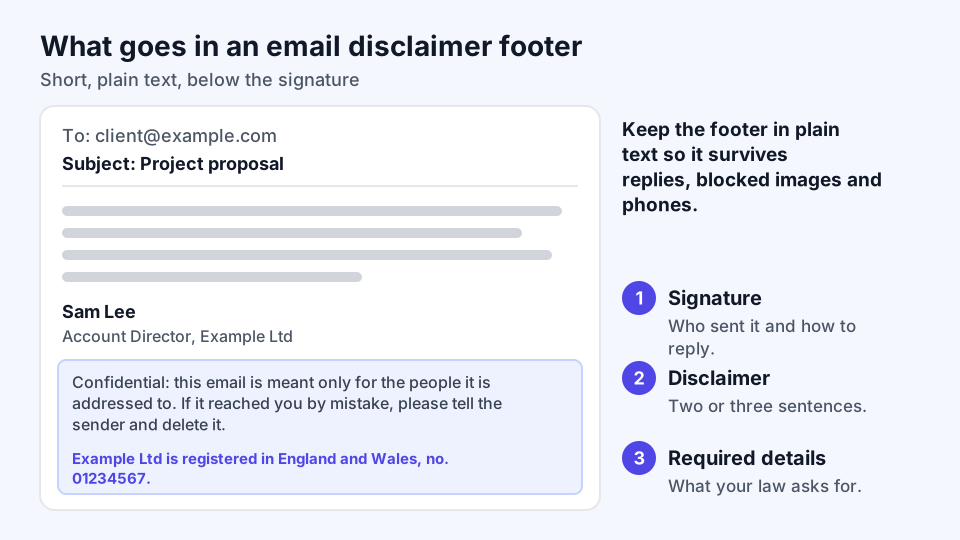
Start with the short version unless you have a reason not to, because long footers get ignored and pile up in every reply. Nothing you type leaves this browser.
Confidential: this email and its attachments are meant only for the people it is addressed to. If you received it by mistake, please tell the sender and delete it. This email does not create a contract unless a signed agreement says so. [Company Name]
- Receiving an email does not mean the recipient agreed to its footer, so put anything binding in a contract.
How to add an email disclaimer in Gmail and Outlook
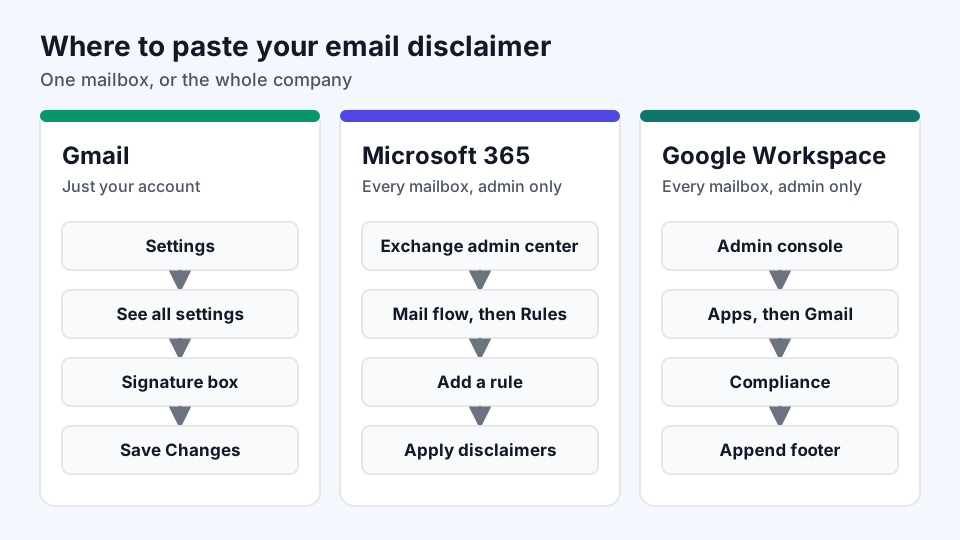
Where the text goes depends on whether it is for your own mailbox or for everyone at the company. Individual signatures rely on each person setting them up, while admin rules apply automatically.
- Trim the generated text.Keep only the clauses that are true of your email. If you never send confidential material, a confidentiality notice adds length without adding anything.
- Add it to your own Gmail account.Open Gmail, click Settings, then See all settings. Paste the text into the Signature section under your name and click Save Changes.
- Add it to your own Outlook account.In Outlook settings, open Accounts and then Signatures. Paste the text below your name, save it, and choose it as the default for new messages and replies.
- Apply it across Microsoft 365.An admin creates a mail flow rule in the Exchange admin center: Mail flow, then Rules, then Add a rule, then Apply disclaimers. Microsoft recommends testing the rule and adding an exception so that footers do not stack up in long threads.
- Apply it across Google Workspace.An admin uses the Append footer setting in the Admin console under Apps, Google Workspace, Gmail and Compliance. By default it adds the footer only to messages going outside your organization.
- Send yourself a test.Send a message to a personal address and reply to it. Check the footer on a phone, and confirm it does not repeat in the thread.
Email disclaimer examples by profession
A footer works better when it speaks to the kind of email you send. These samples are written for specific situations, so adjust the brackets before using one.
One-line email disclaimer
Sent in confidence to the people named above. If that isn't you, please let me know and delete this email.
Email disclaimer for a law firm
This email may contain privileged attorney-client communications. Emailing us does not by itself make you our client, and nothing here is legal advice until we have agreed in writing to represent you. If this reached you by mistake, please tell us and delete it.
Email disclaimer for accountants and consultants
Any tax or accounting comment in this email rests on the facts you gave us and the rules in force today. Please confirm with us in writing that it applies to you before acting on it.
Email disclaimer for sales teams
Prices and terms in this email are for discussion only. Nothing here commits [Company] until both sides sign an order form or contract.
Email disclaimer for clinics
Email is not a secure way to discuss your health, and this inbox is not watched for emergencies. For anything urgent, call [Clinic Phone] or your local emergency number.
Does an email disclaimer protect you?
Less than most footers imply. TechInsurance explains why: a stranger who gets your message by mistake never accepted the footer, so it is hard to hold them to it. One law firm's analysis notes that courts have not directly addressed these footers, which leaves general contract principles as the guide.
The footer still has its uses. It can show that you meant to keep something confidential, and honest recipients usually do what it asks. For anything that matters, put the term in a signed contract and use real safeguards, such as checking the address before sending and leaving sensitive details out of the message.
Details an email disclaimer may need by law
A general disclaimer is usually optional, but some business details are not. Check these if they apply to you:
- UK companies. The 2015 trading disclosure regulations require your registered name on all business correspondence. Business letters and order forms must also show your registered number, registered office and the part of the UK where you are registered, and the rules cover documents in electronic form.
- US marketing email. The FTC's CAN-SPAM guide requires a valid postal address, a clear way to opt out and a clear statement that the message is an advertisement. Opt-outs must be honored within 10 business days, and the guide lists penalties of up to $53,088 per email.
- US healthcare. HHS guidance on HIPAA lets providers email patients if they apply reasonable safeguards. Those are practical steps, such as checking the address and limiting detail, so a footer should not be treated as one of them.
Other countries and regulated professions have their own rules, so ask your regulator or adviser if you are unsure.
Email disclaimer FAQ
Is an email disclaimer legally required?
A general footer usually is not. What can be required is specific information, such as UK company details on business correspondence or a postal address and opt-out in US marketing email.
How long should an email disclaimer be?
Two or three sentences suit most businesses. There is no fixed limit, but a footer longer than the message tends to go unread.
Should an email disclaimer go at the top or the bottom?
The bottom suits routine notices. Put a warning at the top when it must be read first, since TechInsurance advises against hiding important terms at the end of a message.
Should internal emails carry a disclaimer?
Usually not. Google Workspace adds its footer only to outside recipients by default, and Microsoft suggests a condition to limit a rule to outgoing mail.
Should I make my email disclaimer an image?
No. Plain text stays readable when images are blocked, works with screen readers and can be searched later.