Free YouTube disclaimer generator
Fill in your channel name and tick every option that applies to this video. The text updates as you type, and everything stays in your browser. It works as a disclaimer generator for YouTube videos, Shorts and livestream descriptions.
This video uses short excerpts from other people's work for commentary and criticism. [Channel Name] believes this is fair use under 17 U.S.C. § 107 and does not claim to own those excerpts. Rights holders can reach us at [contact email].

Everything said here is the personal opinion of [Channel Name] and does not represent any employer, client or sponsor.

Some links in this description pay [Channel Name] a commission when you buy through them. The price you pay stays the same.
- This text will not stop a Content ID claim. Keep a note of why each clip is needed in case you have to dispute one.
- Mention the affiliate relationship in the video too when you recommend the product.
How to use the YouTube disclaimer generator
A YouTube disclaimer works best when each line answers a question a viewer might reasonably have: whose clip is this, who paid for this, can I rely on this advice? These steps keep the text specific to one upload.
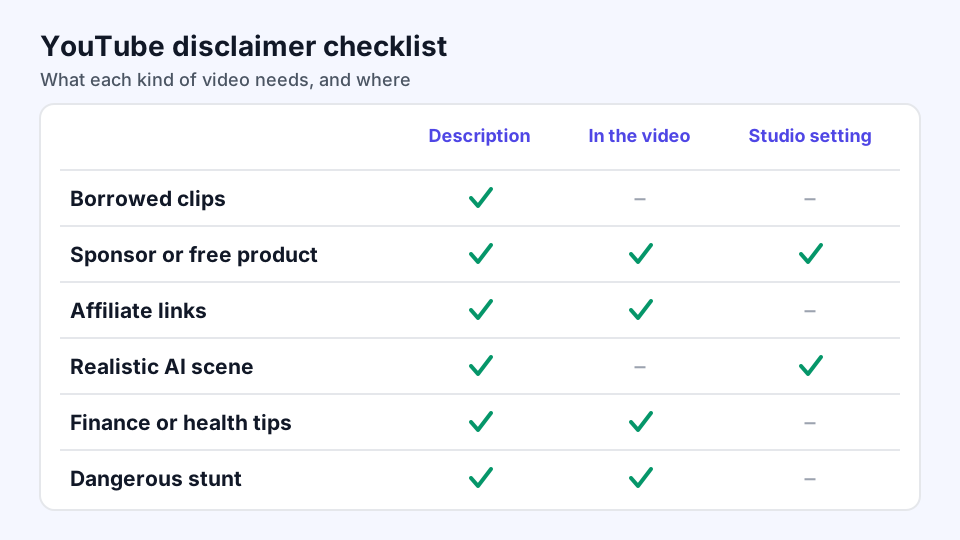
- List what is in the final cut.Go through the finished video, not the script. Note every clip, image and song you did not make, any brand that paid you or sent free products, and any realistic scene made with AI.
- Tick only what applies.A finance warning on a cooking video adds noise, and viewers stop reading boilerplate. When a sponsor joins a later video, generate a new version for that upload.
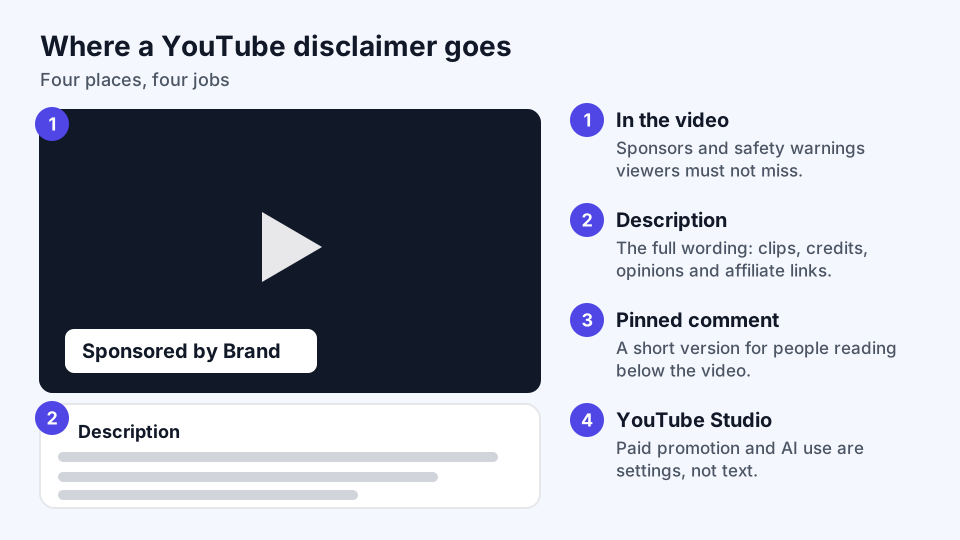
- Choose the placement.Use the description for the full wording, a pinned comment for a shorter version viewers can spot while scrolling, and on-screen text for short lines you can drop into your editor.
- Paste it and read it against the video.Replace anything in square brackets. YouTube collapses long descriptions, so put a line about sponsors or affiliate links above the fold rather than under a wall of hashtags.
- Set the options in YouTube Studio.Some disclosures are settings rather than text. Before publishing, open YouTube Studio and set Paid promotion and AI use to match what you ticked here.
What a YouTube disclaimer can and cannot do
A disclaimer tells viewers how to read a video. It does not hand you rights you lack. YouTube's fair use guidance is blunt about this: no form of words turns a use into fair use, and admitting you are not the owner gives you no licence. Automated systems such as Content ID also cannot judge fair use, so a video with careful wording in its description can still be claimed.
Where it does help is clarity. A sponsor line tells viewers about a commercial relationship, a "not financial advice" line sets expectations for a general explainer, and a credit line gives a music library the attribution its licence asks for. If your real worry is a copyright claim, read the fair use disclaimer guide and the page on why "no copyright infringement intended" fails.
YouTube disclaimer examples by video type
These samples cover situations the checkboxes can only approximate. Edit the brackets, and delete any sentence that is not true of your video.
Disclaimer for a reaction video
I pause and talk over clips from "[Video Title]" by [Creator] so I can respond to them. I do not own the original, and I believe my commentary is fair use. Please watch the full video on their channel: [Link].
Disclaimer for a sponsored review
Paid partnership with [Brand]. They paid for this video and sent me the product. They saw the video before it went live but did not change my verdict. [Delete anything that is not true.]
Disclaimer for an investing channel
I am sharing what I do with my own money, not telling you what to do with yours. Past returns do not predict future ones, and you could lose what you invest. I hold [Ticker or Asset] at the time of recording.
Disclaimer for a workout video
Check with your doctor before starting this routine, especially if you are pregnant, injured or managing a condition. Stop if you feel pain or dizziness. You are exercising at your own risk.
Disclaimer for an AI recreation
The interview at [Timestamp] uses an AI-generated voice reading [Person]'s published letters. That conversation never took place.
YouTube Studio settings a disclaimer does not replace
Two disclosures live in YouTube Studio rather than in your description, and text alone does not satisfy them.
- Paid promotion. If a video includes branded content, sponsorships or endorsements, YouTube requires the paid promotion setting, which adds a label at the start of the video. The FTC's influencer guide also says the disclosure belongs inside the video itself, not only in the description.
- AI use. YouTube's altered content rules ask creators to disclose realistic content that is AI-generated or meaningfully changed, such as a real person appearing to say something they never said. Beauty filters, color fixes and AI help with scripts or thumbnails do not need it.
Creators who repeatedly skip the AI disclosure can have labels added for them, lose content or be suspended from the Partner Program, so treat the setting as part of publishing.
YouTube disclaimer FAQ
Does YouTube require a disclaimer?
Not a general one. YouTube requires specific disclosures for paid promotion and realistic AI content. Other lines, such as a health or finance warning, are your own risk decision, though advertising and professional rules where you live may add more.
Where should a YouTube disclaimer go?
Put the full wording in the description and a short version in a pinned comment. Anything viewers must notice, especially a sponsorship, should also be said or shown in the video.
Will a YouTube disclaimer stop a copyright claim?
No. Content ID matches audio and video and cannot weigh fair use. You can dispute a claim you believe is wrong, but disclaimer text does not prevent one.
Can I reuse one YouTube disclaimer on every upload?
Keep lines that never change, such as your opinion statement, in your default description. Sponsor, music and AI lines belong to individual videos, so write those fresh each time.
Important: This generator gives you a starting draft, not legal advice. Have a lawyer review anything high-stakes, such as a disputed claim or a regulated finance channel.